Posts

Showing posts with the label SQLAgent

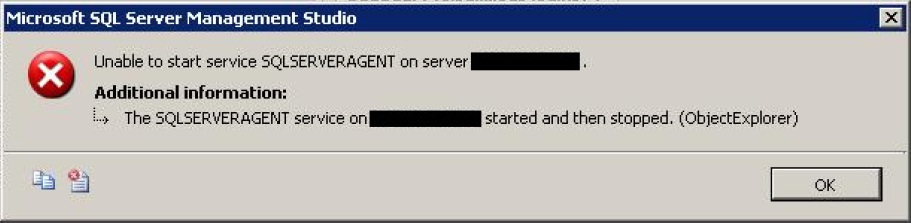
The SQLSERVERAGENT service on MSSQLSERVER started and then stopped
Image
While trying to start the SQL Server 2000 Agent services you might get following error message: The SQLSERVERAGENT service on MSSQLSERVER started and then stopped. This could be because you might have recently changed the password of the sa account. To make sure go to the SQL Agent log output file. By default it would be under "%ProgramFiles%\Microsoft SQL Server\MSSQL\LOG\" folder. Open it and if you see following message: 2000-12-01 04:05:46 - ! [298] SQLServer Error: 18456, Login failed for user 'sa'. [SQLSTATE 28000] 2000-12-01 04:05:46 - ! [000] Unable to connect to server '(local)'; SQLServerAgent cannot start 2000-12-01 04:05:46 - ? [098] SQLServerAgent terminated (normally) The above message in the LOG file confirms that password for sa is wrong. To correct it go to the properties of the SQLServer Agent as below: And in the properties window go to Connection tab and modify the password for the sa account as below:   Now try to s...

Transactional Log file used space monitoring

Following is the T-SQL script to monitor the transactional log file. It specifies the size of log file and how much is being used out of it and also calculates the percentage of use. Also gives information on log file growht and size limit and mentions what it is waiting to reuse the log file. --//-------------------------------------//-- --// Credits http://sqlgear.blogspot.com //-- --//-------------------------------------//-- DECLARE @LogFilePercentUsed INT SET @LogFilePercentUsed = 60 --//Modify the value here to set the threshold SELECT db.NAME ,db.log_reuse_wait_desc ,ls.cntr_value / 1024 AS SizeMB ,lu.cntr_value / 1024 AS UsedMB ,(CAST(lu.cntr_value AS FLOAT) / CAST(ls.cntr_value AS FLOAT)) * 100 AS UsedPercent ,@LogFilePercentUsed AS Threshold ,CASE WHEN (CAST(lu.cntr_value AS FLOAT) / CAST(ls.cntr_value AS FLOAT)) * 100 > @LogFilePercentUsed THEN CASE WHEN db.NAME = 'tempdb' AND log_reuse_wait_desc NOT IN ( 'CHECKPOINT' ...

SQL Server Services Monitoring with PowerShell

Following is the PowerShell script to monitor SQL Server Services. I schedule it to run periodically on each Windows server hosting SQL Server instances, one or more than one. It checks for SQL Server database and agent services which are stopped and attempts to restart them. It also sends email if it finds a service in stopped state. $ServiceNameLike = "SQL Server (*" $Status = "Stopped" $To = "admin@email.com" $Node = gc env:computername $From = $Node +"@email.com" $smtpServer = "mail.server.com" $smtp = new-object Net.Mail.SmtpClient($smtpServer) $StoppedServices=get-service | Where-Object {$_.DisplayName -like $ServiceNameLike -and $_.Status -eq $Status} if ($StoppedServices -ne $null) { foreach ($Service in $StoppedServices) { $Subject = "Attempting to restart service " + $Service.DisplayName + " on "+ $Node $Body = "Service " + $Service.DisplayName + " on "+ ...

Make Money from Surveys