Posts

Showing posts with the label SQLServer

Error for system versioned tables while importing to SQL Server 2012

What does this error mean: Error SQL72014: .Net SqlClient Data Provider: Msg 102, Level 15, State 1, Line 10 Incorrect syntax near 'GENERATED'. CREATE TABLE [dbo].[TableName] (....... On your SQL Azure database from where the export is taken, the table for which the error is shown has system versioning turned on. Following is the code to turn off the system versioning on the table: In case if you want to drop the columns associated with versioning you may run following code to first drop the constraint on both the columns and then drop the columns: ALTER TABLE [dbo].[TableName] DROP CONSTRAINT [DF_SysEnd]; ALTER TABLE [dbo].[TableName] DROP CONSTRAINT [DF_SysStart]; ALTER TABLE [dbo].[TableName] DROP COLUMN [SysStartTime]; ALTER TABLE [dbo].[TableName] DROP COLUMN [SysEndTime]; Note: The constraint names and column names could be different in your case.

Moving SQL Database to In-Premise from Azure? Consider this first.

Image
You can find many articles on the internet for moving to SQL Database but very less on moving to in-premise from SQL Azure . SQL Azure is a good product but sometimes you will need your database to move or copied over to in-premise SQL Server for a task. SQL Azure constantly updating itself and if your in-premise SQL Server in not of the latest version you might face error while trying to import it. This happens when developers are developing on SQL Azure so the code they had written was not tested for compatibility with in-premise. If you start importing the .bacpac file you might face only one error at a time. You fix that in SQL Azure and again start and export and then try importing it and again you face an error with another object. You will face only one error at a time even the database has more than one compatibility issues. So how to know how many such issues are there in SQL Azure database? To find that you have to do this check. Even before you start to export your...

Database in RECOVERY_PENDING State

Recently a job failed with the following error: Database ‘DatabaseName’ cannot be opened due to inaccessible files or insufficient memory or disk space. See the SQL Server error log for details. BACKUP DATABASE is terminating abnormally.”. Possible failure reasons: Problems with the query, “ResultSet” property not set correctly, parameters not set correctly, or connection not established correctly. Database was in RECOVERY_PENDING State and log_rescue_wait_desc was showing ACTIVE_TRANSACTION. There were disk space issues on both drive hosting the Data files and Log files. Making some space free on both these drives did not help. Alter database with set online command helped. Following is the command which was executed: ALTER Database DatabaseName SET ONLINE;

Unable to open the physical file

Image
While trying to attach the .mdf file of a database I faced following error: Msg 5120, Level 16, State 101, Line 1 Unable to open the physical file "D:\AdventureWorks2012_Data.mdf". Operating system error 5: "5(Access is denied.)". This was resolved by running the SQL server management studio as Administrator account shown below.

Restore failed for Server 'ServerName'

I recently faced an error while restoring a database from the backup file on a server. Following is the error I faced: Restore failed for Server 'ServerName'.  (Microsoft.SqlServer.SmoExtended) For help, click: http://go.microsoft.com/fwlink?ProdName=Microsoft+SQL+Server&ProdVer=10.0.2531.0+((Katmai_PCU_Main).090329-1045+)&EvtSrc=Microsoft.SqlServer.Management.Smo.ExceptionTemplates.FailedOperationExceptionText&EvtID=Restore+Server&LinkId=20476 ADDITIONAL INFORMATION: System.Data.SqlClient.SqlError: RESTORE detected an error on page (0:256) in database "DatabaseName" as read from the backup set. (Microsoft.SqlServer.Smo) For help, click: http://go.microsoft.com/fwlink?ProdName=Microsoft+SQL+Server&ProdVer=10.0.2531.0+((Katmai_PCU_Main).090329-1045+)&LinkId=20476 Another similar error was below: Msg 3183, Level 16, State 2, Line 1 RESTORE detected an error on page (0:16777216) in database "DatabaseName" as read from the...

Formatting SQL code

Image
A formatted T-SQL code makes it easier to understand and debug, especially when it is too lengthy. There are many T-SQL code related plugins available for SQL Server management studio. One of the free tool is Notepad++ . It is free you can download it and then add "Poor Man's T-SQL Formatter". From Plugins menu inside Notepad++ add "Poor Man's T-SQL Formatter" from Plugin Manager as shown below:   Now to format the code select the options as below: Your formatted code will now look as below:

The current master key cannot be decrypted

We had the requirement to migrate our cluster to a different domain. We knew that Microsoft does not recommend to migrate the existing cluster to a different domain (Read http://support.microsoft.com/kb/269196 ). The business could not afford the time to build a new cluster in the target domain and move the databases to the SQL Server instance created on target cluster. We uninstalled the SQL server after backing up each database. Server team removed the nodes from the cluster and then moved each node to a new domain. We then installed the SQL Server and attached (since time was constraint) each databases back. All the databases were running fine and we could use them. We restored the master and msdb database so that all the logins, jobs and integration packages are back in place. Later while setting up distribution for replication we faced the first error: There is no remote user 'distributor_admin' mapped to local user '(null)' from the remote server 'repl_dist...

List orphan user from the database

Following is the query to list all the orphan users in a SQL Server database:

Find Stored Proc using referencing a database object

When ever you are renaming a database object you want to make sure you have changed all the code referencing that object. Following is the T-SQL to find a phrase of word in all the database object codes: DECLARE @Text AS NVARCHAR(50) SET @Text = 'DBObjectName' /*Set the variable with the DB Object name, Linked Server name, Database name or just a word string to be searched*/ SELECT DISTINCT sysobjects.NAME ,sysobjects.xtype ,SUBSTRING(syscomments.TEXT, CHARINDEX(@Text, syscomments.TEXT) - ( CASE WHEN CHARINDEX(@Text, syscomments.TEXT) It will give you the name of the object referencing it. Type of the object and also extract of the code around the name of the database object for your reference.

Fixing SYSPOLICY_PURGE_HISTORY job after SQL Server cluster setup

If you have just set up the SQL server 2008 cluster server you will find a job namely SYSPOLICY_PURGE_HISTORY already created under the jobs folder. By default it would be scheduled for daily run. The very next day if you see the job history you will find that this job has failed. If so then  check the PowerShell script inside the job if it refers to the node name as below: (Get-Item SQLSERVER:\SQLPolicy\NodeName\DEFAULT).EraseSystemHealthPhantomRecords() Make this check as a part of you SQL Server Cluster setup checklist. To resolve the failure modify the script by replacing the NodeName with VirtualClusterName  as below: (Get-Item SQLSERVER:\SQLPolicy\VirtualClusterName\DEFAULT).EraseSystemHealthPhantomRecords() This will resolve the issue.

"The WITH MOVE clause can be used to relocate one or more files." Error while restore

Image
Recently trying to restore a database following message was thrown: System.Data.SqlClient.SqlError: File 'F:\DATA\DatabaseName.mdf' is claimed by 'DBFileGroup1'(3) and 'DBFile'(1). The WITH MOVE clause can be used to relocate one or more files. (Microsoft.SqlServer.Smo) The issue might be because of the restore process using same physical file name and path for two different database files. Go to the options tab and see. Following is the screenshot: In any file system there would be no physical files with same name in any given folder. This is why the error comes. Just modify the file name as per your requirement as below: Now hit the OK button. This will restore the database without any error.

Wished you knew how long to wait for a SQL process

Image
Credits unicellular If you are taking backup of a database through wizard or through t-sql script you can get the progress or percent of process completed. This helps when you wait for a backup job to finish before doing your changes to the database. Mostly you plan your changes in prod just after the backup job finishes, and this is obvious option if your database is too big. But the backup job for a database executed by a schedule does not show the progress of it. At this moment you wished how much more you have to wait. Well sys.dm_exec_requests is the DMV for that if you know the session id of the job. SELECT percent_complete FROM sys.dm_exec_requests WHERE session_id = 64 Following script will give you the minutes remaining for the process to be completed. SELECT percent_complete,DateDiff(mi, start_time, GETDATE()) As MinutesTillNow, ((100-percent_complete)*(DateDiff(mi, start_time, GETDATE())))/percent_complete As [MinutesRemaining] FROM sys.dm_exec_requests WHERE session...

There is insufficient memory available in the buffer pool

Image
Recently one of the developers sent me following error: Message: SQL Error [Microsoft OLE DB Provider for SQL Server: There is insufficient memory available in the buffer pool. SQL State: 42000    Native Error: 802 State: 20     Severity: 17 SQL Server Message: There is insufficient memory available in the buffer pool. I checked the memory usage by components under Memory Consumption server report. Following is the screenshot of the report: I found that CACHESTORE_SQLCP was allocated most memory. This type of memory clerk indicates memory consumption by plans of SQL statements or batches not found in any stored procedures, triggers or functions. I just wanted to clear pool for CACHESTORE_SQLCP. The name for this memory clerk is "SQL Plans". Which I found by querying sys.dm_os_memory_clerks dynamic management view. I then executed the following command to clear the pool for CACHESTORE_SQLCP. DBCC FREESYSTEMCACHE('SQL Plans') The memory a...

How to script out the database objects

Image
You might have got requirements to script out the database object and give it to developers. Often developers need codes from current production environment. Here is how to generate scripts from database for all or selected database objects: Right click the database and select Tasks and under that select Generate Scripts...    Select next if the welcome screen appears and then in the next scree select the database for which you want to generate the scripts and press Next. In the Choose Script Option widow select how you wish to script. Do you wish to include a drop statement before or include IF NOT EXISTS. Select your options and press Next. In Choose Object Type window select the object types you want to script out and press Next. For the example I have selected Stored procedures below. In the next few (Based on numbers of object types you have selected) windows select the objects you want to script out. Below is the screen shot and I have hide the names ...

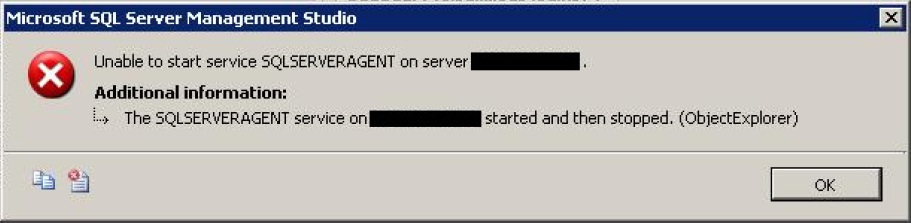
The SQLSERVERAGENT service on MSSQLSERVER started and then stopped

Image
While trying to start the SQL Server 2000 Agent services you might get following error message: The SQLSERVERAGENT service on MSSQLSERVER started and then stopped. This could be because you might have recently changed the password of the sa account. To make sure go to the SQL Agent log output file. By default it would be under "%ProgramFiles%\Microsoft SQL Server\MSSQL\LOG\" folder. Open it and if you see following message: 2000-12-01 04:05:46 - ! [298] SQLServer Error: 18456, Login failed for user 'sa'. [SQLSTATE 28000] 2000-12-01 04:05:46 - ! [000] Unable to connect to server '(local)'; SQLServerAgent cannot start 2000-12-01 04:05:46 - ? [098] SQLServerAgent terminated (normally) The above message in the LOG file confirms that password for sa is wrong. To correct it go to the properties of the SQLServer Agent as below: And in the properties window go to Connection tab and modify the password for the sa account as below:   Now try to s...

Transactional Log file used space monitoring

Following is the T-SQL script to monitor the transactional log file. It specifies the size of log file and how much is being used out of it and also calculates the percentage of use. Also gives information on log file growht and size limit and mentions what it is waiting to reuse the log file. --//-------------------------------------//-- --// Credits http://sqlgear.blogspot.com //-- --//-------------------------------------//-- DECLARE @LogFilePercentUsed INT SET @LogFilePercentUsed = 60 --//Modify the value here to set the threshold SELECT db.NAME ,db.log_reuse_wait_desc ,ls.cntr_value / 1024 AS SizeMB ,lu.cntr_value / 1024 AS UsedMB ,(CAST(lu.cntr_value AS FLOAT) / CAST(ls.cntr_value AS FLOAT)) * 100 AS UsedPercent ,@LogFilePercentUsed AS Threshold ,CASE WHEN (CAST(lu.cntr_value AS FLOAT) / CAST(ls.cntr_value AS FLOAT)) * 100 > @LogFilePercentUsed THEN CASE WHEN db.NAME = 'tempdb' AND log_reuse_wait_desc NOT IN ( 'CHECKPOINT' ...

Make sure the databases are being backed up

Making sure the databases are being backed up is the first check every DBA needs to do. Following is the script to check the the last date of the database backup on current server or list out the databases which were not not backed up within last X number of days. It will also include databases which were never backed up on current server. It works with SQL Server version 2005 and above. --//-------------------------------------//-- --// Credits http://sqlgear.blogspot.com //-- --//-------------------------------------//-- /* Finding last backup date for all the databases OR find the databases not backed up within last X number of days. */ DECLARE @Days AS INT SET @Days = 0 --//If Set to 0 it will show you the last backup dates for the databases SELECT 'Database ' + d.NAME + ' was ' + CASE MAX(ISNULL(b.backup_finish_date, '1900-01-01 00:00:00.000')) WHEN '1900-01-01 00:00:00.000' THEN ' never backedup.' ELSE 'last backed up on ...

SQL Server Services Monitoring with PowerShell

Following is the PowerShell script to monitor SQL Server Services. I schedule it to run periodically on each Windows server hosting SQL Server instances, one or more than one. It checks for SQL Server database and agent services which are stopped and attempts to restart them. It also sends email if it finds a service in stopped state. $ServiceNameLike = "SQL Server (*" $Status = "Stopped" $To = "admin@email.com" $Node = gc env:computername $From = $Node +"@email.com" $smtpServer = "mail.server.com" $smtp = new-object Net.Mail.SmtpClient($smtpServer) $StoppedServices=get-service | Where-Object {$_.DisplayName -like $ServiceNameLike -and $_.Status -eq $Status} if ($StoppedServices -ne $null) { foreach ($Service in $StoppedServices) { $Subject = "Attempting to restart service " + $Service.DisplayName + " on "+ $Node $Body = "Service " + $Service.DisplayName + " on "+ ...

Scripting out the logins but not all

Image
When you are migrating the all the databases on a server to another then you might have used sp_help_revlogin to script out the logins. That was easy! But if your SQL instance from where you are moving the databases is holding databases for multiple application and application owner do not agree on migrating databases on same date. Or say you want to move different databases to different target servers. In this case you need to script out logins for particular database only. You can use following query, after setting the results to text, to get login creation script for logins associated with perticular database only. Step 1. Setting the results to text: Step 2. Execute the following query in the database for which logins are to be scripted: USE DatabaseName; GO SELECT 'EXEC [dbo].[sp_help_revlogin] @login_name = [' + l.NAME + ']' FROM sys.sysusers u INNER JOIN sys.syslogins l ON l.sid = u.sid You will get the output as follows: Step 3. Copy the outpu...

Database cannot be opened

Image
One of our developers raised an issue mentioning that he tried to connect to the database but and he seemed database was corrupt\disabled. He mentioned that the day before they did some work on that database which made the database grow considerably. Following is the message he faced: Database 'abc' cannot be opened due to inaccessible files or insufficient memory or disk space. See the SQL Server errorlog for details. (Microsoft SQL Server, Error: 945) When I connected to the SQL server instance I found that I was not able to expand the database abc and when I checked the shutdown property of database I found that it was shutdown. Following is the screenshot. I executed following commands to make the database offline. Make sure you do this from the server itself and not from any client machine. USE master; GO ALTER DATABASE abc SET offline; GO Then executed the following command to make the database online again. USE master; GO ALTER DATABASE abc SET online; GO This b...

Make Money from Surveys