Posts

"The WITH MOVE clause can be used to relocate one or more files." Error while restore

Image
Recently trying to restore a database following message was thrown: System.Data.SqlClient.SqlError: File 'F:\DATA\DatabaseName.mdf' is claimed by 'DBFileGroup1'(3) and 'DBFile'(1). The WITH MOVE clause can be used to relocate one or more files. (Microsoft.SqlServer.Smo) The issue might be because of the restore process using same physical file name and path for two different database files. Go to the options tab and see. Following is the screenshot: In any file system there would be no physical files with same name in any given folder. This is why the error comes. Just modify the file name as per your requirement as below: Now hit the OK button. This will restore the database without any error.

Wished you knew how long to wait for a SQL process

Image
Credits unicellular If you are taking backup of a database through wizard or through t-sql script you can get the progress or percent of process completed. This helps when you wait for a backup job to finish before doing your changes to the database. Mostly you plan your changes in prod just after the backup job finishes, and this is obvious option if your database is too big. But the backup job for a database executed by a schedule does not show the progress of it. At this moment you wished how much more you have to wait. Well sys.dm_exec_requests is the DMV for that if you know the session id of the job. SELECT percent_complete FROM sys.dm_exec_requests WHERE session_id = 64 Following script will give you the minutes remaining for the process to be completed. SELECT percent_complete,DateDiff(mi, start_time, GETDATE()) As MinutesTillNow, ((100-percent_complete)*(DateDiff(mi, start_time, GETDATE())))/percent_complete As [MinutesRemaining] FROM sys.dm_exec_requests WHERE session...

There is insufficient memory available in the buffer pool

Image
Recently one of the developers sent me following error: Message: SQL Error [Microsoft OLE DB Provider for SQL Server: There is insufficient memory available in the buffer pool. SQL State: 42000    Native Error: 802 State: 20     Severity: 17 SQL Server Message: There is insufficient memory available in the buffer pool. I checked the memory usage by components under Memory Consumption server report. Following is the screenshot of the report: I found that CACHESTORE_SQLCP was allocated most memory. This type of memory clerk indicates memory consumption by plans of SQL statements or batches not found in any stored procedures, triggers or functions. I just wanted to clear pool for CACHESTORE_SQLCP. The name for this memory clerk is "SQL Plans". Which I found by querying sys.dm_os_memory_clerks dynamic management view. I then executed the following command to clear the pool for CACHESTORE_SQLCP. DBCC FREESYSTEMCACHE('SQL Plans') The memory a...

Count rows for all tables

Image
Sometimes you may need to find number of rows in each (or few) tables. Following query will determine the number of rows in each partition of each table in each schema.

How to script out the database objects

Image
You might have got requirements to script out the database object and give it to developers. Often developers need codes from current production environment. Here is how to generate scripts from database for all or selected database objects: Right click the database and select Tasks and under that select Generate Scripts...    Select next if the welcome screen appears and then in the next scree select the database for which you want to generate the scripts and press Next. In the Choose Script Option widow select how you wish to script. Do you wish to include a drop statement before or include IF NOT EXISTS. Select your options and press Next. In Choose Object Type window select the object types you want to script out and press Next. For the example I have selected Stored procedures below. In the next few (Based on numbers of object types you have selected) windows select the objects you want to script out. Below is the screen shot and I have hide the names ...

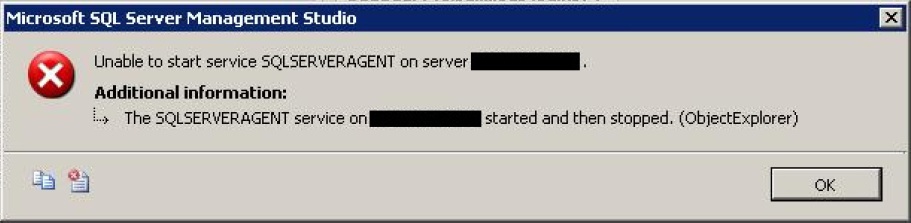
The SQLSERVERAGENT service on MSSQLSERVER started and then stopped

Image
While trying to start the SQL Server 2000 Agent services you might get following error message: The SQLSERVERAGENT service on MSSQLSERVER started and then stopped. This could be because you might have recently changed the password of the sa account. To make sure go to the SQL Agent log output file. By default it would be under "%ProgramFiles%\Microsoft SQL Server\MSSQL\LOG\" folder. Open it and if you see following message: 2000-12-01 04:05:46 - ! [298] SQLServer Error: 18456, Login failed for user 'sa'. [SQLSTATE 28000] 2000-12-01 04:05:46 - ! [000] Unable to connect to server '(local)'; SQLServerAgent cannot start 2000-12-01 04:05:46 - ? [098] SQLServerAgent terminated (normally) The above message in the LOG file confirms that password for sa is wrong. To correct it go to the properties of the SQLServer Agent as below: And in the properties window go to Connection tab and modify the password for the sa account as below:   Now try to s...

Transactional Log file used space monitoring

Following is the T-SQL script to monitor the transactional log file. It specifies the size of log file and how much is being used out of it and also calculates the percentage of use. Also gives information on log file growht and size limit and mentions what it is waiting to reuse the log file. --//-------------------------------------//-- --// Credits http://sqlgear.blogspot.com //-- --//-------------------------------------//-- DECLARE @LogFilePercentUsed INT SET @LogFilePercentUsed = 60 --//Modify the value here to set the threshold SELECT db.NAME ,db.log_reuse_wait_desc ,ls.cntr_value / 1024 AS SizeMB ,lu.cntr_value / 1024 AS UsedMB ,(CAST(lu.cntr_value AS FLOAT) / CAST(ls.cntr_value AS FLOAT)) * 100 AS UsedPercent ,@LogFilePercentUsed AS Threshold ,CASE WHEN (CAST(lu.cntr_value AS FLOAT) / CAST(ls.cntr_value AS FLOAT)) * 100 > @LogFilePercentUsed THEN CASE WHEN db.NAME = 'tempdb' AND log_reuse_wait_desc NOT IN ( 'CHECKPOINT' ...

Make Money from Surveys